
Protecting your WooCommerce store from fraud and malicious users is critical to maintaining a secure and trustworthy shopping environment. Fraudsters often exploit online stores by using stolen credit cards, abusing discount codes, initiating chargebacks, or placing fake orders to exploit shipping and payment loopholes. To combat these threats, it’s essential to blacklist users who exhibit suspicious behavior. These fraudulent activities not only drain your revenue but can damage your relationship with payment gateways and harm your brand’s reputation.
One of the most effective ways to combat these threats is by implementing fraud prevention tools and WooCommerce user blacklisting techniques. You can block suspicious users based on email addresses, IP locations, billing countries, or even specific email domains. When combined with features like Currency Switcher for WooCommerce—which helps manage international pricing more accurately—you can deliver a smooth experience to genuine shoppers while stopping bad actors at the door.
By proactively blacklisting high-risk users and identifying fraudulent patterns early, you significantly enhance your store’s security, protect your customers, and preserve your business integrity.
The Hidden Risks of WooCommerce Fraud—and Why Prevention Is Critical
Fraud in WooCommerce isn’t just a minor inconvenience—it’s a serious threat that can disrupt operations, drain resources, and damage your store’s reputation. Recognizing the full impact of fraudulent activity is the first step toward creating a secure and trustworthy e-commerce environment.
Here are the key dangers store owners face:
- Costly Financial Losses
Chargebacks, refund scams, and fraudulent orders can quickly eat into your revenue and profit margins, especially when left unchecked. - Loss of Customer Trust and Brand Reputation
A store that falls victim to frequent fraud may appear unreliable or insecure, causing legitimate customers to lose confidence and shop elsewhere. - Wasted Time and Resources
Resolving disputes, managing chargebacks, and reviewing suspicious transactions diverts your team’s focus from growth-oriented tasks. - Legal and Payment Processor Risks
Failing to properly manage fraud can result in breaches of payment provider agreements and even legal action, leading to penalties, frozen accounts, or merchant restrictions.
The good news? These risks are preventable. By proactively using tools to block fraudulent users, IPs, and emails, you can stay ahead of threats. Learn how to fortify your WooCommerce store with this detailed guide to blocking fraud in WooCommerce using IP addresses.
Putting the right protection in place helps you avoid unnecessary losses and ensures a seamless shopping experience for your legitimate customers.
How to Identify and Block Fraudulent Users in WooCommerce
Protecting your WooCommerce store from fraud begins with recognizing the warning signs of suspicious behavior. Proactively blacklisting risky users helps reduce chargebacks, avoid revenue loss, and maintain trust with your customers. Here are key indicators and tactics for detecting fraud before it harms your business:
1. Unusual Payment Activity
Fraudsters frequently use stolen or fake credit cards. Be alert to:
- Abnormally high order values compared to your average sales.
- Billing and shipping addresses that don’t match or differ from the cardholder’s name.
- Multiple failed payment attempts, suggesting someone is testing stolen card data.
2. Frequent Order Edits or Modifications
Repeated changes to order details soon after checkout may be a sign of someone trying to exploit shipping, billing, or discount vulnerabilities.
3. Suspicious IP Addresses and Geographic Patterns
Cybercriminals often hide their locations using proxies or VPNs. Watch for:
- Orders from countries or regions where you rarely receive customers.
- Multiple orders placed from a single IP address within a short time, which may indicate automated fraud attempts.
4. High-Risk International Shipping Zones
Some countries are more prone to fraudulent transactions. If your store sells globally, it’s smart to monitor and limit orders from these regions using custom shipping restrictions. Learn how to configure this in WooCommerce with this international shipping zones setup guide.
5. Incomplete or Inconsistent Customer Accounts
Fake users often register with minimal or mismatched information. Keep an eye out for:
- Profiles are missing key details (name, full address, contact info).
- Data that appears random, inconsistent, or fake.
By combining behavioral insights with blocking tools, you can effectively flag and prevent fraudulent activity. Implementing these strategies ensures a safer environment for genuine customers while shielding your WooCommerce store from unnecessary risk.
How to Implement a Blacklist System in WooCommerce to Block Fraudulent Users
Enhancing your WooCommerce store’s security starts with setting up a powerful blacklist system to block unwanted and fraudulent transactions. The Aelia Blacklister WooCommerce Plugin offers flexible and robust tools that let you easily manage and enforce blacklist rules to protect your store.
What Is Aelia Blacklister for WooCommerce?
Aelia Blacklister is a comprehensive WooCommerce plugin designed to block orders and registrations from suspicious or malicious users. You can filter and prevent fraud by setting rules based on multiple user criteria, including:
- Full Name (First and Last Name)
- Address Details (Street, Postal Code, City, State/Province, Country)
- Email Address
- Phone Number
- IP Address
Step-by-Step Guide to Setting Up Aelia Blacklister
Step 1: Download and Install the Plugin
- Download the Plugin
Visit the official Aelia website to purchase or download the latest version of the Blacklister plugin. You will receive a ZIP file containing the plugin. - Upload the Plugin to WordPress
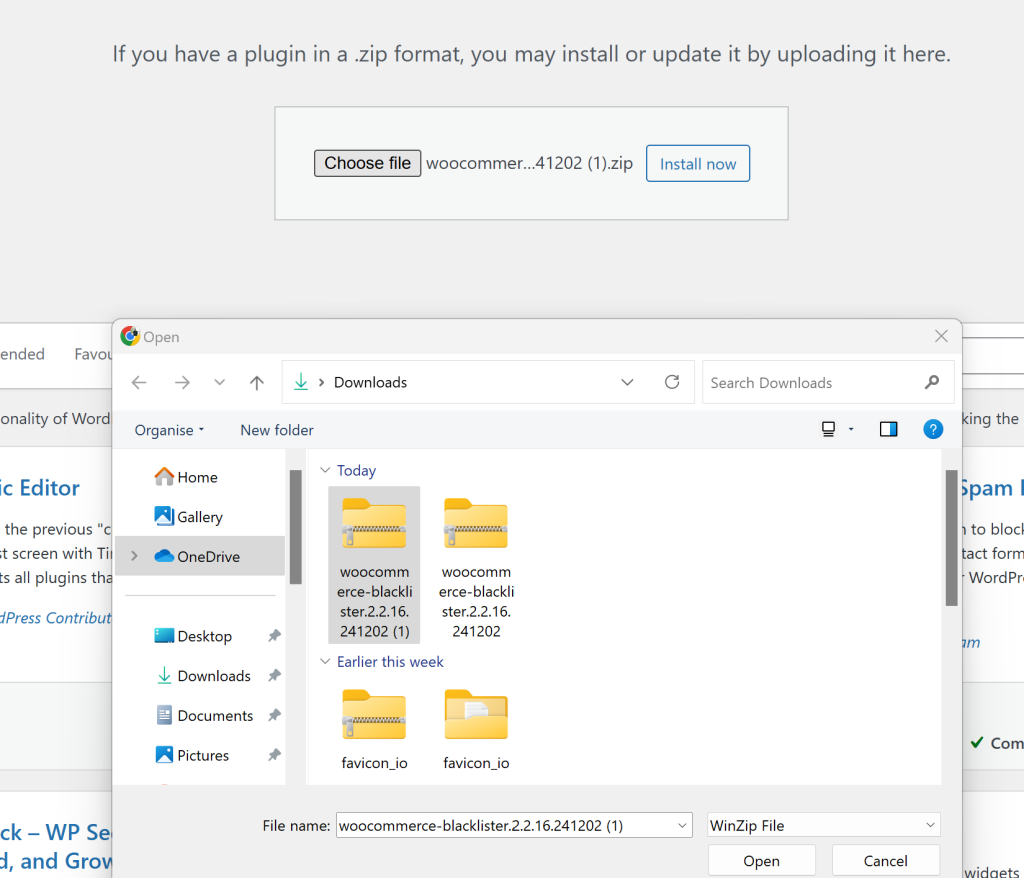
- Log in to your WordPress admin dashboard.
- Navigate to Plugins > Add New and click Upload Plugin.
- Choose the downloaded ZIP file and click Install Now.
- Activate the Plugin
Once installed, click Activate Plugin. You should now see Aelia Blacklister listed as active and accessible via WooCommerce settings.
Step 2: Configure Blacklist Rules
After activation, you can start setting up blocking rules tailored to your store’s needs:
1. Block by Full Name
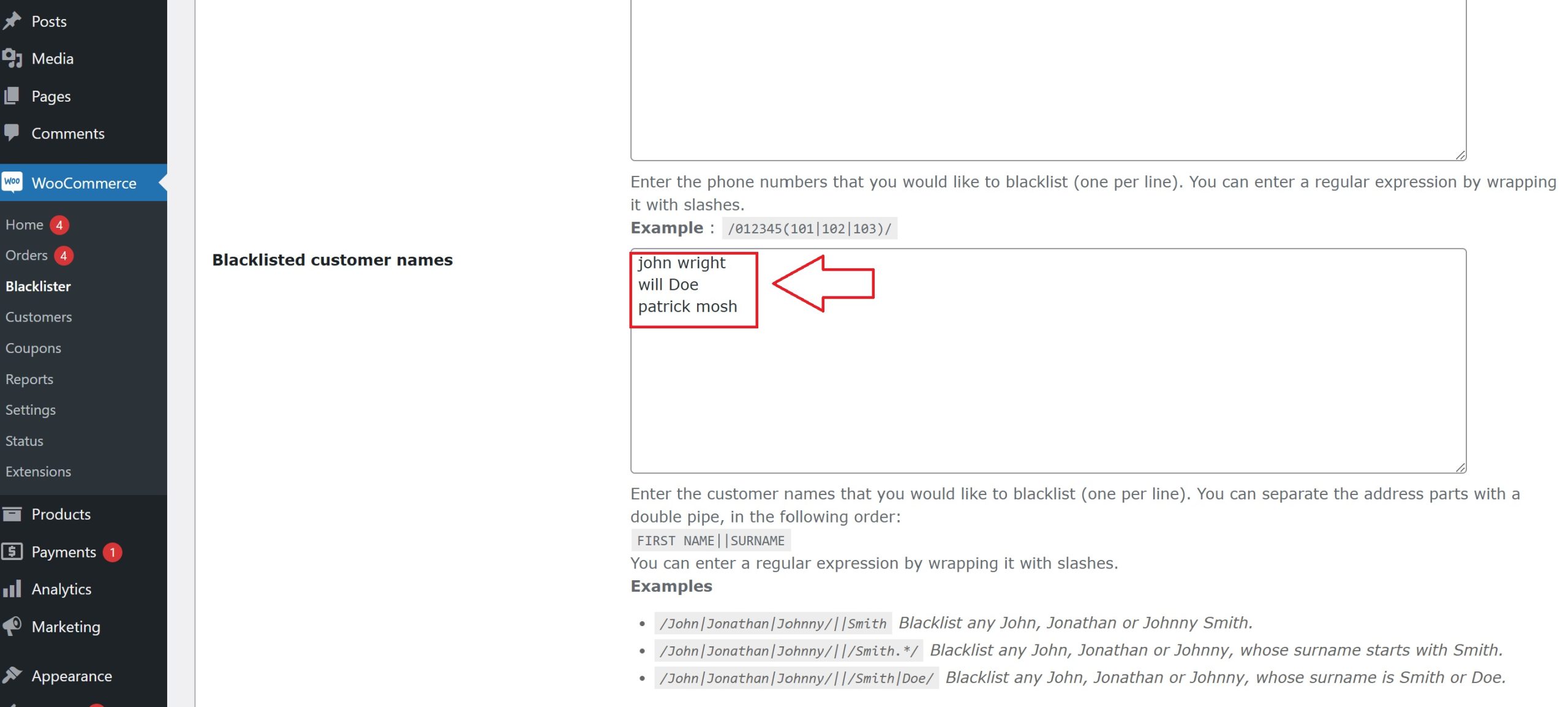
- How: Enter first names, last names, or full names to block specific individuals.
- Why: Fraudsters may change emails or IPs but often reuse the same names. Blocking by name helps prevent repeat offenses.
- Steps: Go to the Blacklist Customer section, add names, and save.
2. Block by Address Details
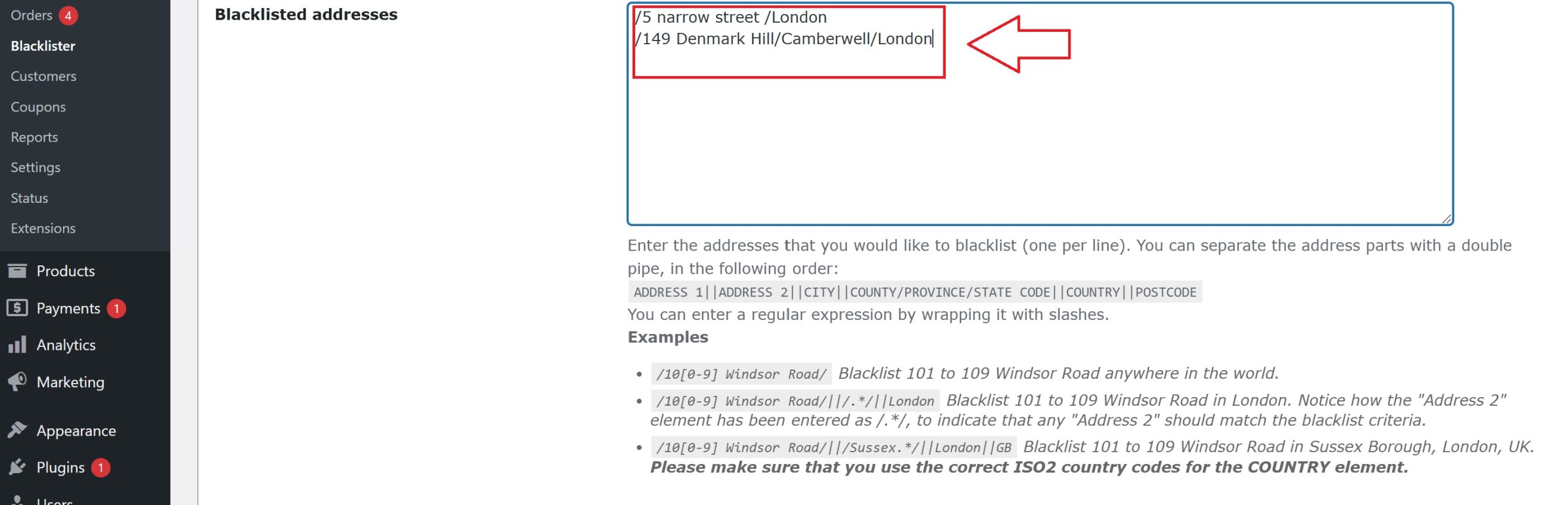
- How: Block orders based on street, postal code, city, state/province, or country.
- Why: Many fraudsters use fake or stolen addresses, often from high-risk areas.
- Steps: Enter full or partial address details in the plugin settings and save your changes.
3. Block by Email Address

- How: Specify email addresses or domains to block, including disposable email providers (e.g.,
*@tempmail.com). - Why: Temporary emails are commonly used for fraudulent accounts.
- Steps: Add emails or domains to the blacklist and save.
4. Block by Phone Number

- How: Block specific phone numbers or entire area codes.
- Why: Fraudsters use fake or stolen numbers to place orders.
- Steps: Enter phone numbers or area codes in the plugin settings and save.
5. Block by IP Address
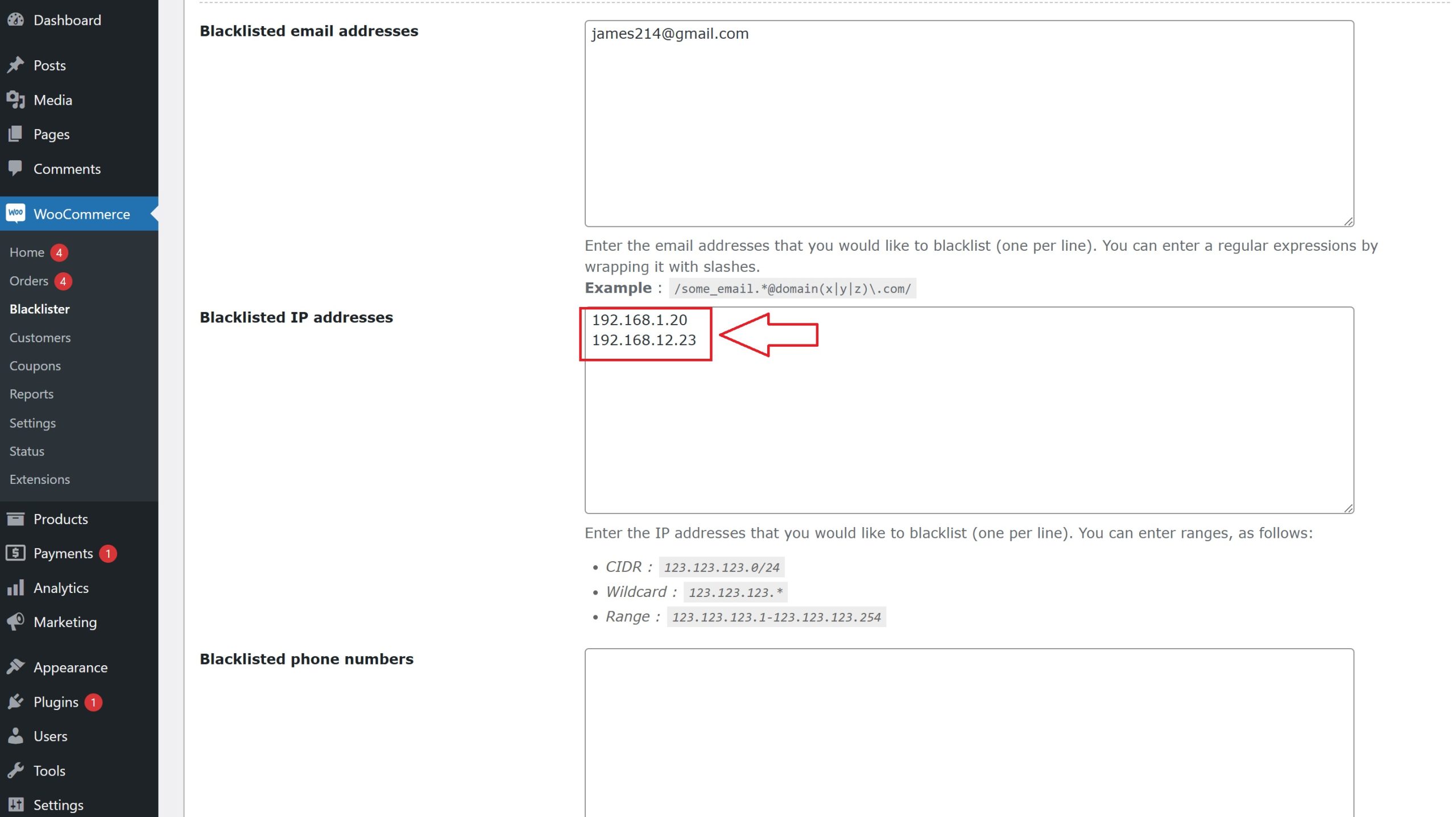
- How: Block individual IPs or IP ranges using wildcards or regex patterns.
- Why: Prevent repeat fraud attempts from the same network or IP range.
- Steps: Add IPs or patterns to the blacklist and save.
Final Step: Save and Activate Your Rules
Once all your blacklist criteria are entered, make sure to save or update your settings to activate the rules. Regularly review and update your blacklist to adapt to emerging fraud patterns and keep your WooCommerce store safe.
Implementing a blacklist system with Aelia Blacklister empowers you to block fraud effectively, reduce chargebacks, and protect your store’s reputation